

In short
A class booking system is software that lets your participants book, cancel and pay for classes online themselves. When choosing, look for a transparent price on the website, monthly cancellation and a free migration of your existing data. That’s exactly what StudioHero offers small boutique studios.
You run a small studio (yoga, Pilates, EMS, reformer, small-group fitness, whatever it is) and still manage class spots via WhatsApp, Excel and word of mouth. At some point that tips over. Then you spend your evenings answering messages instead of living. That’s exactly the moment you start looking for a class booking system.
This article explains, without the sales pitch, what such a system has to do, what it honestly costs, and why StudioHero is built for exactly that.
What is a class booking system, and what does it do for you?

A class booking system is software that lets your participants choose, book, cancel and pay for classes online themselves, via an app or your website, around the clock. You set up your class schedule once. The system handles sign-ups, spots and payments in the background.
Two distinctions help put it in context. A simple appointment calendar manages individual appointments. It knows nothing about classes with limited spots, waitlists or 10-class passes. Large studio management software also covers contract management, access control and branch structures: things a small studio rarely needs but pays for anyway. The class booking system sits in between: lean enough for a one-person studio, specialised enough for real class operations.
StudioHero fills exactly that gap: classes, private sessions, rooms and instructors in one view, without the baggage of enterprise management software.
The everyday benefit is concrete: nobody messages you at 10 pm asking “Is there still a spot tomorrow?”. You no longer keep an Excel list with three versions doing the rounds. You chase money less often, because payment happens at booking. You teach, the software manages.
The features a class booking system really needs
Provider websites try to outdo each other with feature lists: long, shiny, interchangeable. For a small studio only one question counts: what do you really need every week? Everything else is baggage. It makes the software more complicated and more expensive. For a broader look at the whole software topic, see our guide gym software at a glance.
Here’s the honest split into must-haves and nice-to-haves, and how StudioHero handles each point.
The must-have features for small studios
24/7 online booking. Your participants book and cancel themselves whenever they like: at night, at the weekend, any time. That’s what takes the most off your plate. With StudioHero a member can book at eleven at night without you ever having to pick up the phone.
Automatic waitlist. If someone cancels, the next person moves up automatically, including a notification. Without this feature you’re chasing cancellations by phone. StudioHero reassigns free spots automatically as soon as someone cancels.
Payment at booking. In our experience, people who pay when they book turn up more reliably. No-shows don’t disappear completely, but they drop noticeably. Important for studios: support for 10-class passes and credit, because many participants don’t want a membership. StudioHero handles memberships, 10-class passes and single bookings cleanly. Payments run by SEPA Direct Debit and card via Stripe, including correct VAT invoices.
Automatic reminders. Reminders and easy rebooking reduce no-shows and fill waitlists faster. For you that means fewer empty mats and less lost revenue. In StudioHero, reminders and no-show rules run automatically, without you sending them by hand.
Participant list at a glance. Before class, one look is enough. Five seconds and you know who’s coming, who’s new and who’s on the waitlist.
Website integration. Your class schedule sits on your website and updates itself. No copy-paste, no outdated PDF schedules.
Nice-to-have, but rarely decisive
Some features are pleasant, but rarely decide between success and frustration:
- Automatic invoices save time on bookkeeping. Handy, but you can do without them at the start.
- Workshops and events bookable in the same system are nice if you offer them regularly.
- Sending Zoom links automatically only matters if you teach online classes.
- Multiple booking for class blocks helps with fixed 8-week courses, such as prevention courses.
Beware of feature overkill: marketing automation, AI analytics, branch management. Sounds impressive. You still pay for it every month without ever using it. Every feature you don’t need makes the software more complicated, for you and for your participants.
How much does a class booking system cost?
Prices on the market vary a lot depending on the features and the billing model, and that’s exactly what makes comparison hard as long as a provider doesn’t show its price openly.
You’ll come across two pricing models:
- Flat monthly price: You pay a fixed amount, no matter how many participants book. Predictable, and usually the better choice for growing studios.
- Price per member or participant, or a commission per booking: Sounds cheap at first, but gets more expensive the more successful you become.
Factor in the hidden costs: transaction fees on every online payment, email or SMS allowances you have to buy extra, and setup fees that some providers charge once.
A simple honesty test: is the price shown openly on the website? If you have to book a demo before you get a number, the provider is counting on sales pressure rather than transparency.
StudioHero passes this test: Start from 39 €, Studio Pro from 89 €, Studio Ultra from 169 € per month excl. VAT, billed by active members rather than bookings. No commission per booking, no hidden add-ons, a price guarantee in the first year. What you see on the website is what you pay.
A free class booking system: is it any good?
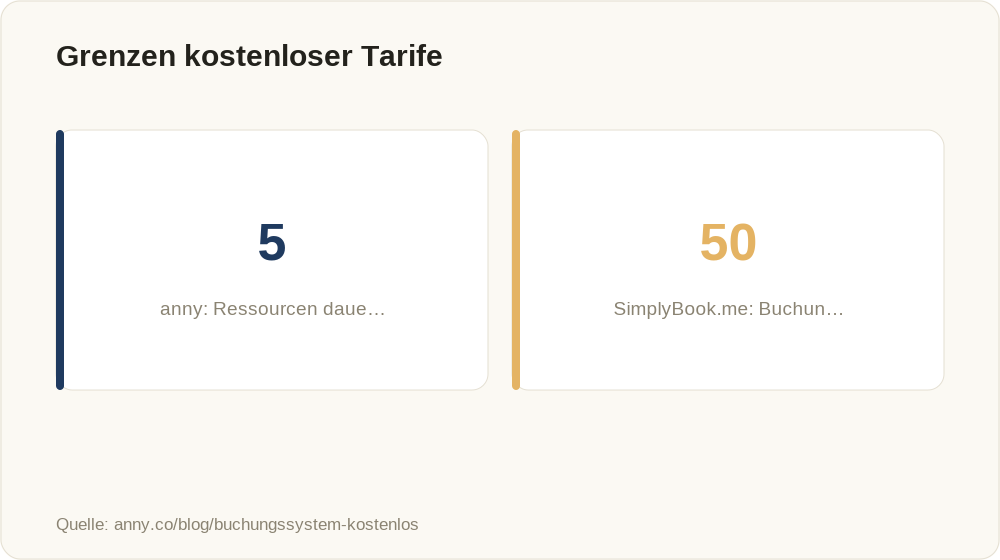
Free offers exist on the market, but they have their price elsewhere. They usually limit the number of users, features or support so much that they’re only suitable for a single instructor with a few classes. As soon as you want online payments, 10-class passes or an app, you end up on a paid plan anyway. WordPress plugin solutions also add tinkering: updates, compatibility and data protection configuration are then down to you.
The most honest way to start for free is therefore a real, time-limited trial of a paid system, not a permanently cut-down free plan. With StudioHero you test with your real classes before you pay a cent, and when you switch, your existing data from Eversports, Fitogram, Mindbody or Excel is migrated for free.
In brief: a permanently free system is only enough if you teach solo, run few classes and handle payments separately. Once your studio grows, participants should pay online and you need reliable support, you’re better off with a fairly priced paid system like StudioHero.
The most common pitfalls when choosing

In conversations with studio owners, the same frustrations come up again and again. Here are five pitfalls you should know about:
- Long contract terms. A minimum term of 12 or 24 months ties you to a system before you know whether it fits. Insist on monthly cancellation. StudioHero never ties you in for longer than a month.
- Data lock-in. If you can’t easily export your member and booking data, you’re stuck. Ask before you start: “How do I get out again with my data?” With StudioHero you can export at any time with one click.
- Price only after a demo. A provider that hides its price wants to negotiate rather than convince. StudioHero shows all three plans openly on its website.
- Enterprise overkill. Software for studio chains buries a small studio in complexity. If after the demo you’re wondering what half the menus are for, look for a lean alternative to the big platforms.
- Servers outside the EU. You process your participants’ personal data. StudioHero runs entirely on EU servers, which makes GDPR life much easier for you.
How to make the right choice: your checklist
Go through these six questions before you commit:
- Does it fit your studio? Class sizes, 10-class passes, memberships, workshops: your class format has to fit without contortions.
- Is the price transparent? Is it on the website, including all fees?
- Can you cancel monthly? If not, why doesn’t the provider dare to offer it?
- Can everyone cope with it? Your 68-year-old regular has to be able to book just as intuitively as the 25-year-old. Test booking from the participant’s point of view.
- Do you get real support? A person who answers, not just a chatbot and a help centre.
- Can you test it and take your data with you? A free trial plus data export are the minimum.
StudioHero meets all six points: a transparent price, monthly cancellation, real human support in German and English, free data export and a setup that’s done in an afternoon rather than an onboarding project.
And then: test first, decide afterwards. During the trial, set up real classes, have two or three regular clients book and see where things get stuck. Two weeks of real-world testing tell you more than any feature table.
How StudioHero solves this for small studios
We build StudioHero for exactly the studios this article is about: small fitness, Pilates, yoga, EMS and reformer studios, often with one person at the helm. Booking, member management, payments: all in one system. Fair and honest, from Europe.
In practice that means: the price is shown openly on our website and you can cancel monthly. We migrate your existing member and class data (from Eversports, Fitogram, Mindbody or Excel) for free when you start. No mandatory demo, plus transparent and fair contract terms. By the way, that also applies if you’re just opening a studio and want a clean booking system from day one.
To be honest: if you run a chain with several branches, access control and your own marketing department, you’re better off with the big platforms. For everyone else: try StudioHero free with your real classes, and then decide.
Frequently asked questions
What is a class booking system?
A class booking system is software that lets participants choose, book, cancel and pay for classes online. It replaces manual admin via WhatsApp, phone and Excel and handles spots, waitlists and payments automatically in the background. In StudioHero that includes private sessions and rooms in the same view.
How much does a class booking system cost for a small studio?
At StudioHero the price is shown openly on the website: Start from 39 €, Studio Pro from 89 €, Studio Ultra from 169 € per month excl. VAT, billed by active members rather than per booking. No commission, no hidden add-ons, a price guarantee in the first year.
Is there a free class booking system?
Permanently free systems are almost always limited in the number of users, features or support. A free trial with real classes is more honest. StudioHero offers one, including a free migration of your existing data.
Which features does a small yoga or Pilates studio really need?
Five things: 24/7 online booking, a waitlist with automatic move-up, payment at booking including 10-class passes, automatic reminders against no-shows and a clear participant list. Anything beyond that is nice-to-have.
What should I look out for in the contract?
Three points: monthly cancellation instead of a 12 or 24-month minimum term, a transparent price on the website instead of a mandatory sales call, and easy data export so you can switch with your member and booking data at any time. StudioHero meets all three.

Written by
Studio software with no small print
Booking, members and payments for your studio. Fixed price, no commission per booking.
From 39 € a month · no credit card · cancel monthly · free migration

